Counters
A counter is a simple device intended to do one simple thing - count. Using them, however, can sometimes be a challenge because every manufacturer (for whatever reason) seems to use them a different way. Rest assured that the following information will let you simply and easily program anybody's counters.
What kinds of counters are there? Well, there are up-counters (they only count up 1,2,3...). These are called CTU,(count up) CNT,C, or CTR. There are down counters (they only count down 9,8,7,...). These are typically called CTD (count down) when they are a separate instruction. There are also up-down counters (they count up and/or down 1,2,3,4,3,2,3,4,5,...) These are typically called UDC(up-down counter) when they are separate instructions.
Many manufacturers have only one or two types of counters but they can be used to count up, down or both. Confused yet? Can you say "no standardization"? Don't worry, the theory is all the same regardless of what the manufacturers call them. A counter is a counter is a counter...
To further confuse the issue, most manufacturers also include a limited number of high-speed counters. These are commonly called HSC (high-speed counter), CTH (CounTer High-speed?) or whatever.
Typically a high-speed counter is a "hardware" device. The normal counters listed above are typically "software" counters. In other words they don't physically exist in the plc but rather they are simulated in software. Hardware counters do exist in the plc and they are not dependent on scan time.
A good rule of thumb is simply to always use the normal (software) counters unless the pulses you are counting will arrive faster than 2X the scan time. (i.e. if the scan time is 2ms and pulses will be arriving for counting every 4ms or longer then use a software counter. If they arrive faster than every 4ms (3ms for example) then use the hardware (high-speed) counters. (2xscan time = 2x2ms= 4ms)
To use them we must know 3 things:
- Where the pulses that we want to count are coming from. Typically this is from one of the inputs.(a sensor connected to input 0000 for example)
- How many pulses we want to count before we react. Let's count 5 widgets before we box them, for example.
- When/how we will reset the counter so it can count again. After we count 5 widgets lets reset the counter, for example.
When the program is running on the plc the program typically displays the current or "accumulated" value for us so we can see the current count value.
Typically counters can count from 0 to 9999, -32,768 to +32,767 or 0 to 65535. Why the weird numbers? Because most PLCs have 16-bit counters. We'll get into what this means in a later chapter but for now suffice it to say that 0-9999 is 16-bit BCD (binary coded decimal) and that -32,768 to 32767 and 0 to 65535 is 16-bit binary.
Here are some of the instruction symbols we will encounter (depending on which manufacturer we choose) and how to use them. Remember that while they may look different they are all used basically the same way. If we can setup one we can setup any of them.
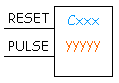
In this counter we need 2 inputs.
One goes before the reset line. When this input turns on the current (accumulated) count value will return to zero.
The second input is the address where the pulses we are counting are coming from.
One goes before the reset line. When this input turns on the current (accumulated) count value will return to zero.
The second input is the address where the pulses we are counting are coming from.
For example, if we are counting how many widgets pass in front of the sensor that is physically connected to input 0001 then we would put normally open contacts with the address 0001 in front of the pulse line.
Cxxx is the name of the counter. If we want to call it counter 000 then we would put "C000" here.
yyyyy is the number of pulses we want to count before doing something. If we want to count 5 widgets before turning on a physical output to box them we would put 5 here. If we wanted to count 100 widgets then we would put 100 here, etc. When the counter is finished (i.e we counted yyyyy widgets) it will turn on a separate set of contacts that we also label Cxxx.
Note that the counter accumulated value ONLY changes at the off to on transition of the pulse input.
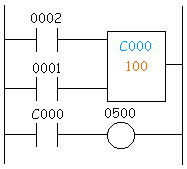
Here's the symbol on a ladder showing how we set up a counter (we'll name it counter 000) to count 100 widgets from input 0001 before turning on output 500. Sensor 0002 resets the counter.
Below is one symbol we may encounter for an up-down counter. We'll use the same abbreviation as we did for the example above.(i.e. UDCxxx and yyyyy)
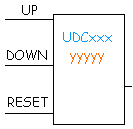
In this up-down counter we need to assign 3 inputs. The reset input has the same function as above. However, instead of having only one input for the pulse counting we now have 2. One is for counting up and the other is for counting down. In this example we will call the counter UDC000 and we will give it a preset value of 1000. (we'll count 1000 total pulses) For inputs we'll use a sensor which will turn on input 0001 when it sees a target and another sensor at input 0003 will also turn on when it sees a target. When input 0001 turns on we count up and when input 0003 turns on we count down. When we reach 1000 pulses we will turn on output 500. Again note that the counter accumulated value ONLY changes at the off to on transition of the pulse input. The ladder diagram is shown below.

 and view the animation to really learn!
One important thing to note is that counters and timers can't have the same name (in most PLCs). This is because they typically use the same registers. We haven't learned about timers yet but you might make a note of this for future reference because it's pretty important.
Well, the counters above might seem difficult to understand but they're actually quite easy once we get used to using them. They certainly are an essential tool. They are also one of the least "standardized" basic instructions that we will see. However, always remember that the theory is the same from manufacturer to manufacturer! ترجمه حرفيه للسابق
عدادات
عداد جهاز بسيط تعتزم القيام به شيء واحد بسيط -- العد. به منهم ، ومع ذلك ، يمكن في بعض الأحيان تحديا لأن كل مورد (لأي سبب كان) ويبدو ان استخدامها بطريقة مختلفة. تطمئن إلى أن المعلومات التالية سوف تتيح لك ببساطة وسهولة عدادات أحدا البرنامج.
ما هي أنواع من العدادات هناك؟ حسنا ، هناك ما يصل عدادات (وتعول فقط بالتسجيل 1،2،3...). وتسمى هذه CTU ، (العدد متابعة) المركز الوطني للاستشعار ، وجيم ، أو الظهور. هناك عدادات أسفل (وتعول فقط بانخفاض 9،8،7 ،...). هذه هي عادة دعا جنة التجارة والتنمية (العد التنازلي) عندما تكون تعليمة منفصلة. وهناك أيضا عدادات يصل إلى الأسفل (وتعول و / أو لأسفل 1،2،3،4،3،2،3،4،5 ،...) هذه الشركة المتحدة للتنمية وتسمى عادة (في مكافحة أسفل) عندما وتعليمات منفصلة.
العديد من الشركات المصنعة واحد فقط أو نوعين من عدادات ولكن يمكن استخدامها لحساب أعلى أو لأسفل أو كليهما. بعد الخلط؟ يمكنك أن تقول "لا توحيد"؟ لا تقلق ، فإن هذه النظرية كل نفس بغض النظر عن ما مصنعين ندعو لهم. عداد عداد عداد...
لمزيد من الخلط بين هذه المسألة ، فإن معظم الشركات المصنعة وتشمل أيضا عددا محدودا من العدادات عالية السرعة. وتسمى عادة هذه شهادة الثانوية العامة (كاونتر عالية السرعة) ، تغيير رؤوس التعريفة (كاونتر عالي السرعة؟) أو أيا كان.
عادة ما تكون عالية السرعة مضادة هي "الأجهزة" الجهاز. العدادات العادية المذكورة أعلاه وعادة ما تكون "البرمجيات" العدادات. وبعبارة أخرى لم تكن موجودة فعليا في المجلس التشريعي الفلسطيني ، بل هم المحاكاة في مجال البرمجيات. عدادات الأجهزة موجودة في المجلس التشريعي الفلسطيني وانها لا تعتمد على المسح الضوئي الوقت.
وهناك قاعدة جيدة من التجربة هو ببساطة دائما استخدام العادي (البرامج) عدادات ما لم البقول كنت عد ستصل أسرع من 2x التفحص الوقت. (أي إذا كان وقت الفحص 2ms والبقول وسوف يكون وصوله لحساب كل 4ms أو أطول ثم استخدام برامج مضادة ، وإذا وصولها أسرع من كل 4ms (3ms على سبيل المثال) ثم استخدام الأجهزة (عالية السرعة) عدادات (2xscan الوقت = = 4ms 2x2ms)
لاستخدامها يجب علينا أن نعرف 3 أشياء :
1.
حيث البقول أننا نريد أن تأتي من العد. هذا هو عادة من واحدة من المدخلات (جهاز استشعار متصلة المدخلات 0000 على سبيل المثال)
2.
كم عدد نبضات نريد ان نرد قبل العد. دعونا العد 5 الحاجيات قبل أن مربع منها ، على سبيل المثال.
3.
عندما / كيف سنقوم إعادة تعيين العداد حتى انها تستطيع الاعتماد مرة أخرى. ونحن نعول بعد 5 الحاجيات يتيح إعادة تعيين العداد ، على سبيل المثال.
عند تشغيل البرنامج على المجلس التشريعي الفلسطيني يعرض البرنامج عادة الحالية أو "تراكم" قيمة بالنسبة لنا حتى نتمكن من معرفة قيمة الاعتماد الحالي.
عدادات نموذجيا يمكن الاعتماد 0 حتي 9999 ، إلى 32767 -32768 أو 0 حتي 65535. لماذا أرقام غريبة؟ لأن معظم الشركات المحدودة العامة وعدادات 16 بت. سوف نصل الى ما وهذا يعني في فصل لاحق لكنه الآن ويكفي أن نقول أن 0-9999 هو 16 بت قاعدي (ثنائي عشري ترميز) والتي -32٬768-32٬767 و0 حتي 65535 هو 16 بت ثنائي.
وهنا بعض من رموز التعليم ونحن سوف تواجه (اعتمادا على الشركة المصنعة التي نختار) وكيفية استخدامها. تذكر أنه في حين أنها قد تبدو مختلفة وتستخدم كل ما في وأساسا بنفس الطريقة. اذا كنا نستطيع إعداد واحد يمكننا إعداد أي واحد منهم.
مكافحة رمز 1
في هذا العداد نحتاج 2 المدخلات.
واحد يذهب قبل السطر إعادة تعيين. متى يتحول هذا الإدخال على حساب القيمة الحالية (المتراكم) العودة إلى نقطة الصفر.
الإدخال الثاني هو عنوان حيث البقول ونحن نعول تأتي من.
على سبيل المثال ، إذا نحن نعول كيف كثير من الحاجيات تمر أمام أجهزة الاستشعار التي ترتبط فعليا لإدخال 0001 ثم نحن من شأنه أن يضع اتصالات مفتوحة عادة مع عنوان 0001 أمام خط النبض.
Cxxx هو اسم وصفة طبية. إذا كنا نريد أن نسميها عداد 000 ثم نحن من شأنه أن يضع "C000" هنا.
yyyyy هو عدد النبضات نريد أن نفعل شيئا قبل العد. إذا كنا نريد أن العد 5 الحاجيات قبل ان يتحول على الانتاج الفعلي إلى مربع لهم نحن هنا من شأنه أن يضع 5. إذا أردنا أن عدد 100 الحاجيات ثم سوف نضع هنا 100 ، وما إلى ذلك عند انتهاء العداد (أي اعتمدنا الحاجيات yyyyy) سيكون بدوره على مجموعة منفصلة من الاتصالات التي نحن أيضا تسمية Cxxx.
لاحظ أن مكافحة التغيرات المتراكمة قيمة إلا في حالا على الانتقال من المدخلات النبض.
مكافحة سلم
ها هي رمز على سلم عرض كيفية انشاء عداد (سنقوم تسميته مكافحة 000) لحساب 100 الحاجيات من المدخلات 0001 قبل ان يتحول على الناتج 500. 0002 الاستشعار يعيد العداد.
أدناه هو رمز واحد ونحن قد تواجهها لمكافحة بالتسجيل في أسفل. سنستخدم الاختصار نفسه كما فعلنا في المثال أعلاه (أي UDCxxx وyyyyy)
أعلى / أسفل رمز مكافحة
في هذا العداد في أسفل أننا بحاجة إلى تعيين 3 المدخلات. إعادة الإدخال لديه نفس الوظيفة على النحو الوارد أعلاه. ومع ذلك ، بدلا من وجود واحد فقط لإدخال نبض العد لدينا الآن 2. هو واحد بالنسبة عد والآخر عن العد التنازلي. في هذا المثال سوف نسميه UDC000 مضادة ، وسوف تعطيه القيمة مسبقا من 1000. (سوف نعول 1000 البقول الكلية) للحصول على المدخلات سنستخدم جهاز استشعار الذي سيقوم بدوره على مدخلات 0001 عندما ترى هدفا آخر والاستشعار المدخلات في 0003 سوف تتحول أيضا عندما يرى هدفا. عندما يتحول على مدخلات 0001 ونحن نعول في 0003 ، وعندما يتحول على المدخلات ونحن نعول عليها. عند وصولنا الى 1000 البقول ونحن سوف تتحول على الناتج 500. مرة أخرى لاحظ أن مكافحة التغيرات المتراكمة قيمة إلا في حالا على الانتقال من المدخلات النبض. ويبين الرسم البياني أدناه سلم.
أعلى / أسفل سلم مضادة
انقر هنا عرض للرسوم المتحركة! وعرض الرسوم المتحركة لتعلم حقا!
شيء واحد مهم هو أن نلاحظ أن العدادات والموقتات لا يمكن أن يكون لها نفس الاسم (في معظم الشركات المحدودة العامة). هذا هو لأنها تستخدم عادة يسجل نفسه. نحن لم نتعلم بعد حول توقيت ولكن هل يمكن تقديم مذكرة من هذا كمرجع في المستقبل لانه مهم جدا.
حسنا ، قد يبدو العدادات أعلاه يصعب فهمها ولكنها في الواقع من السهل جدا مرة واحدة أننا تعودنا على استخدامها. هم بالتأكيد أداة أساسية. بل هي أيضا واحدة من أقل التعليمات "موحدة" الأساسية التي سوف نرى. ومع ذلك ، تذكر دائما أن النظرية هو نفسه من مصنع لآخر!

ليست هناك تعليقات:
إرسال تعليق